
Custom Bot: Privileged Intent Review
If you run a Custom Bot and it can reach 10,000 or more users, Discord requires you — as the owner of the application — to submit a Privileged Intent request form in the Developer Portal. This page explains why, and walks you through the entire form with ready-to-use answers.
Who this applies to
Discord counts the unique users who can see your app across all servers it is in. A custom bot usually lives in a single server, so in practice: if your server has 10,000+ members, this applies to you. If your bot stays under 10,000 users, you don't need to do anything — the intent toggles in the Developer Portal keep working as before.
Why Discord requires this
In June 2026, Discord changed how apps get access to Privileged Intents (Server Members, Message Content, and Presence — the intents that expose member and message data). The key changes:
- The review threshold is now user-based, not server-based. Previously only apps in 100+ servers needed approval. Now, once an app can reach 10,000 unique users, its owner must apply for Privileged Intent access — even if the bot is in a single server.
- You get notified, then you have 90 days. When your app crosses the threshold, Discord notifies the application owner by email and/or system DM, and shows a notice in the Developer Portal. From that notification you have 90 days to submit the form. Your app keeps its intents while the review is pending if you submit within the window.
- If you don't apply in time, the intents are removed. You can re-apply later, but the bot loses access in the meantime.
- Approved apps re-apply once a year to confirm continued access.
Discord's own guide to the process is here: Getting Started with Privileged Intent Review, and their overview of what these intents are is here.
What happens to your custom bot if you miss the deadline
Both intents are required to run a custom bot. Without the Server Members Intent the bot cannot run at all — invite tracking, join/leave messages, verification, leaderboards: everything stops, and the bot goes offline. Losing the Message Content Intent breaks ticket transcripts. Submit the form as soon as you receive the notification.
Which intents to request
| Intent | Request it? | Why |
|---|---|---|
| Server Members Intent | Yes — required | Invite tracking is built on member join/leave events. The custom bot refuses to start without this intent. |
| Message Content Intent | Yes — required | The custom bot runs the full Invite Tracker feature set, and message content powers ticket transcripts. Request it even if you don't use tickets yet — enabling tickets later with a missing intent means broken transcripts. |
| Presence Intent | No — leave unchecked | Invite Tracker never reads presence (online status/activity) data. Requesting an intent you don't use is a common reason applications get denied. |
Before you fill out the form
- In the Developer Portal, open your application → Bot tab and confirm both the Server Members Intent and Message Content Intent toggles are enabled — this should already be the case from the Custom Bot setup.
- On the General Information tab, set the Privacy Policy URL field to
https://invite-tracker.com/legal/privacy-policy. The form asks about your privacy policy, and this makes it visible on your bot's profile. - Open the intent request form from the notice on your application's page in the Developer Portal.
You do not need to capture any screenshots: the screenshot links the form asks for are already included in the answers below. They are official Invite Tracker screenshots hosted on this documentation site.
Filling out the form
Copy the answers below into the matching fields — they are written so they apply to any custom bot as-is, screenshots included. No editing needed.
Application Details — "What does your application do?"
This application is a white-label ("custom bot") instance of Invite Tracker (invite-tracker.com), running under my own application as part of Invite Tracker Premium's Custom Bot feature. It serves exclusively my own community server and is not publicly invitable.

Invite Tracker is an invite-tracking and community-management bot. In my server it: tracks which invite and which member brought every new member and keeps invite statistics and leaderboards; sends configurable join/leave messages and welcome banners; verifies new members and protects the server against raids; counts messages for activity statistics; runs giveaways; and provides a support ticket system with ticket transcripts. It is configured through the Invite Tracker web dashboard (invite-tracker.com).
"Do you have a public Privacy Policy telling your users about their data usage?"
Select Yes.
"Where is your Privacy Policy available?"
The bot runs the Invite Tracker service, whose Privacy Policy is publicly available at https://invite-tracker.com/legal/privacy-policy (linked from the service's website and dashboard). It is also set as the Privacy Policy URL on this application's profile in the Developer Portal, so it is visible directly on the bot's profile in Discord."Please share a link to your Privacy Policy."
https://invite-tracker.com/legal/privacy-policyPrivileged Gateway Intents
Tick Server Members Intent and Message Content Intent. Leave Presence Intent unchecked.
Server Members Intent — "Why do you need the Guild Members intent?"
This application runs Invite Tracker (invite-tracker.com) as a custom-branded bot for a single server. Invite tracking is the core purpose of the bot and is built directly on member events, which require this intent:

1. Invite attribution on join: whenever a member joins, the bot determines which invite link and which inviter brought them, updates that inviter's invite counts, and records the join for server statistics and analytics.
2. Join/leave messages: the bot sends configurable welcome/leave messages (including welcome banner images) that show the member and their inviter.
3. Leaves and invite integrity: when a member leaves, the bot updates the inviter's statistics (regular/left counts) so leaderboards stay accurate, and it flags fake invites by checking the account age of joining members.
4. Verification, raid protection and auto roles: new members go through verification (button, captcha or website) to receive their verification role, and can be kicked or banned if they do not verify in time; join surges are monitored to detect raids; and configured auto roles are assigned to every new member. All of this runs on member join events and role data.

Without this intent none of the above works: the bot cannot see members joining or leaving. We do not use presence data and are not applying for the Presence intent.
"Please provide links to screenshots and/or videos that demonstrate your use case"
Join message with invite attribution: https://docs.invite-tracker.com/assets/custom-bot/intent-review/join-message.png
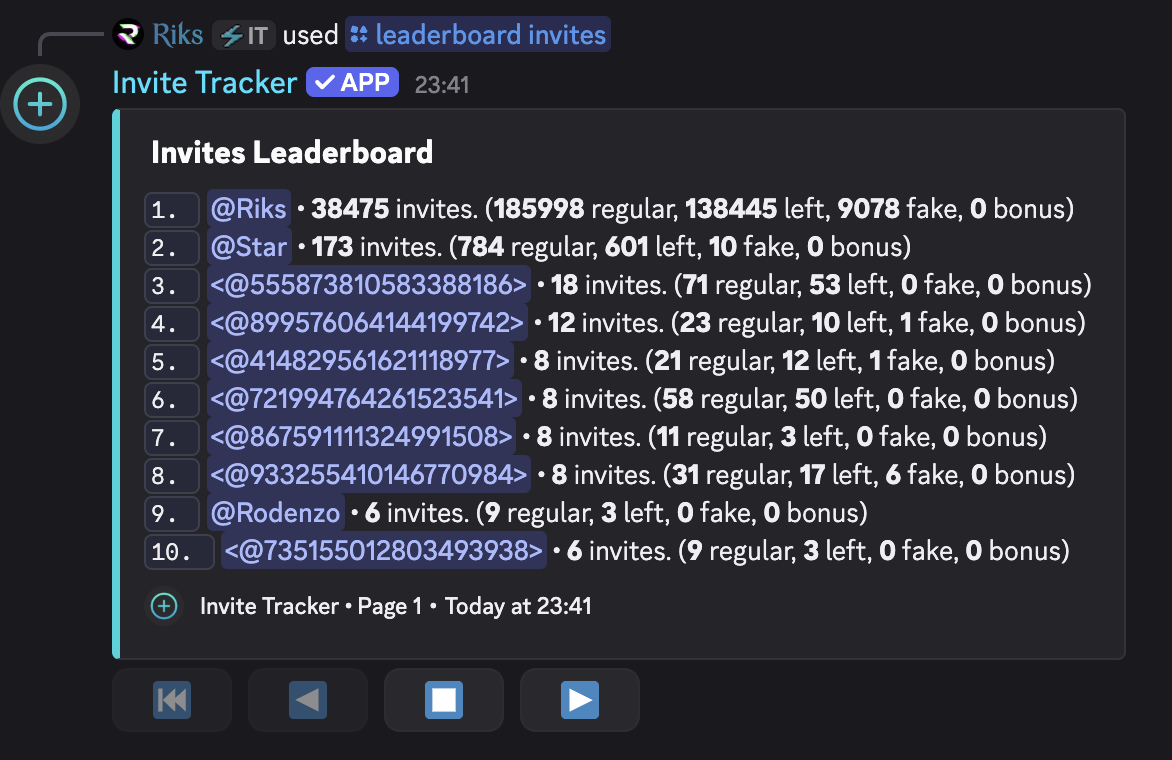
Invites leaderboard: https://docs.invite-tracker.com/assets/custom-bot/intent-review/invites-leaderboard.png
These are the linked screenshots:

"Are you storing any API Data off-platform (outside of Discord)?" → Yes
"Are you storing API Data for 30 days or less?" → No
"How do users contact you to request deletion of their activity data?"
Data access and deletion requests are handled by the Invite Tracker service: users create a ticket on the Invite Tracker support server (support.invite-tracker.com) or follow the process in the Privacy Policy (https://invite-tracker.com/legal/privacy-policy). Approved requests are processed within 30 days."Are you encrypting the data that you store at rest, as is required by our developer policy?" → Yes
Message Content Intent
"Can users opt-out of having their message content data tracked?" → Yes
"Are you storing message content data off-platform (outside of Discord)?" → Yes
"Are you storing user message content data for 30 days or less?" → No
"How do users contact you to request deletion of their activity data?"
Data access and deletion requests are handled by the Invite Tracker service: users create a ticket on the Invite Tracker support server (support.invite-tracker.com) or follow the process in the Privacy Policy (https://invite-tracker.com/legal/privacy-policy). Users can opt out of having their message content included in future ticket transcripts, and can request deletion of their messages from existing transcripts, the same way. Approved requests are processed within 30 days."Are you encrypting the data that you store at rest, as is required by our developer policy?" → Yes
"Will the message content data be used to train machine learning or AI Models?" → No
"Why do you need the Message Content intent?"
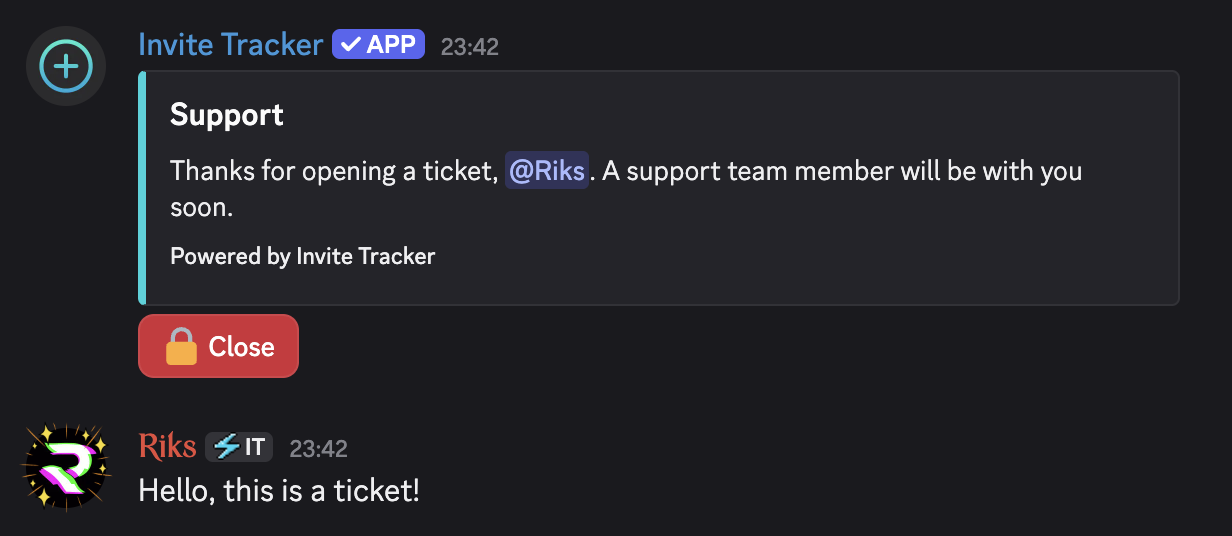
The bot provides Invite Tracker's support ticket feature for my server. When a ticket is closed, the bot exports the ticket conversation as an HTML transcript for the server's ticket history, so staff can review past support cases and resolve disputes. Rendering a transcript requires reading the message content of the ticket channel - this is exactly what the intent is used for, as described in the Invite Tracker Privacy Policy ("Use message content from ticket channels to generate and render ticket transcripts")."Please provide links to screenshots and/or videos that demonstrate your use case"
A support ticket handled by the bot: https://docs.invite-tracker.com/assets/custom-bot/intent-review/ticket.pngThis is the linked screenshot:
Acknowledgement
Read the certification statement, tick the checkbox, and Submit.
After you submit
- Your bot keeps its intents during the review as long as you submitted within the 90-day window, and it can keep growing while the review is pending.
- Once approved, expect an annual re-review: Discord notifies you when it's time, and you get 90 days to reconfirm. The answers on this page stay valid — keep them handy.
- If your application is denied or you miss the window, the intents are removed and your custom bot will go offline (it cannot start without the Server Members Intent). You can re-apply from the Developer Portal at any time, but invite tracking stays down until access is restored — so treat the deadline seriously.
Need help?
If you're unsure about any field or your application was denied, join our support server and open a ticket — we'll help you sort it out.