
Honeypot
A honeypot is a visible trap channel that no real member would ever post in. Spam bots that join and flood every channel they can see post straight into it, and Invite Tracker punishes them within seconds of their first message. The trap itself is free for every server; punishment tuning, custom warnings and a few extra options are part of Premium.
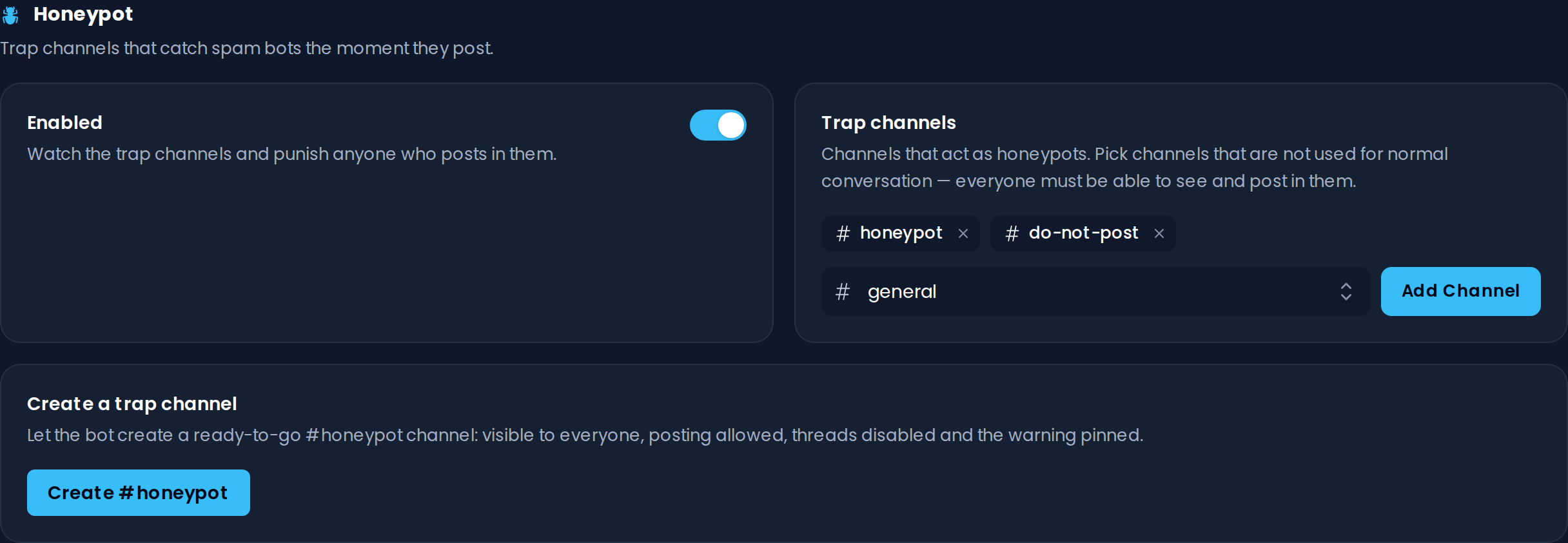
The honeypot is disabled by default: open the dashboard's Honeypot page, add at least one trap channel and turn on Enabled to get started.
Trap Channels
A trap channel must be an ordinary text channel that everyone can see and post in, because that's what makes it irresistible to spam bots. Use a dedicated channel, never one used for real conversation. Announcement channels can't be used as traps, and your log channel can't be a trap channel.
Pick channels in the Trap channels setting, or use the Create #honeypot button under Create a trap channel to set one up in a single click: visible to everyone, posting allowed, threads disabled and the warning pinned.
If a trap channel gets deleted on Discord, it is removed from the honeypot automatically and a notice is posted to your log channel.
INFO
Free servers can have 1 trap channel; Premium servers can have up to 5.
WARNING
To create the channel for you, the bot needs the Manage Channels, Create Public Threads, Create Private Threads and Send Messages in Threads permissions (or Administrator), so it can turn off threads in the new channel.
Warning Message
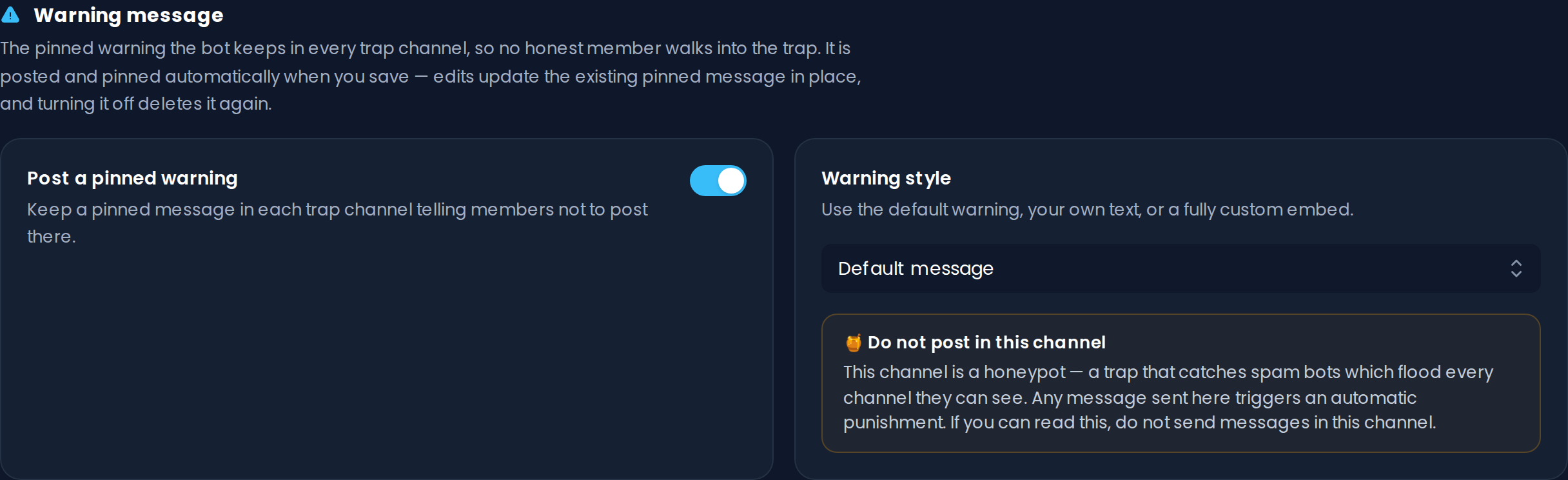
To make sure no honest member walks into the trap, the bot keeps a pinned warning in every trap channel explaining exactly what it is. The warning is posted and pinned automatically when you save. Edits update the pinned message in place, and turning off Post a pinned warning or removing the channel deletes it again.
With Warning style you choose what the warning looks like:
- Default message: the stock warning, previewed right on the dashboard.
- Custom text: your own warning text (up to 2000 characters), shown in place of the default message.
- Custom embed: a fully custom embed, built with the embed editor.
Premium feature
Free servers always post the default warning. Changing the Warning style or turning off Post a pinned warning requires Invite Tracker Premium.
WARNING
The bot needs the Send Messages and Manage Messages permissions in the trap channel to post and pin the warning. The dashboard shows a notice if it couldn't post the warning in one of your trap channels.
Punishment
Any message from a non-exempt member in a trap channel triggers the punishment chosen under Action:
- Kick & purge messages (the default): the member is removed and everything they sent in the last 24 hours is deleted from every channel. They are not banned, so a wrongly caught human can simply rejoin.
- Ban: the member is banned, and their recent messages are deleted as well.
- Timeout: the member is timed out for the Timeout duration (hours) you set (1 to 672 hours, 24 by default) and their trigger message is deleted.
- Log only: nothing happens to the member; the trigger is only recorded and reported. This is a safe way to test the trap.
For Kick & purge messages and Ban, Delete message history (hours) sets how far back their messages are deleted (0 to 168 hours, 24 by default). With 0, only the trigger message is removed.

Premium feature
Free servers always use Kick & purge messages with a 24 hour message history. Changing the action, the message history or the timeout duration requires Invite Tracker Premium.
WARNING
Invite Tracker needs the Ban Members permission for Kick & purge messages and Ban, Moderate Members for Timeout, and Manage Messages to clean up trigger messages. Its role must also be above the roles of the members it punishes. The dashboard shows a notice while any of these permissions are missing.
The server owner and members whose top role is at or above the bot's can't be punished; the report says so. If Discord keeps refusing punishments (usually because the bot lost a permission), punishments are paused for a few minutes. Catches during the pause are still recorded and reported.
Exemptions
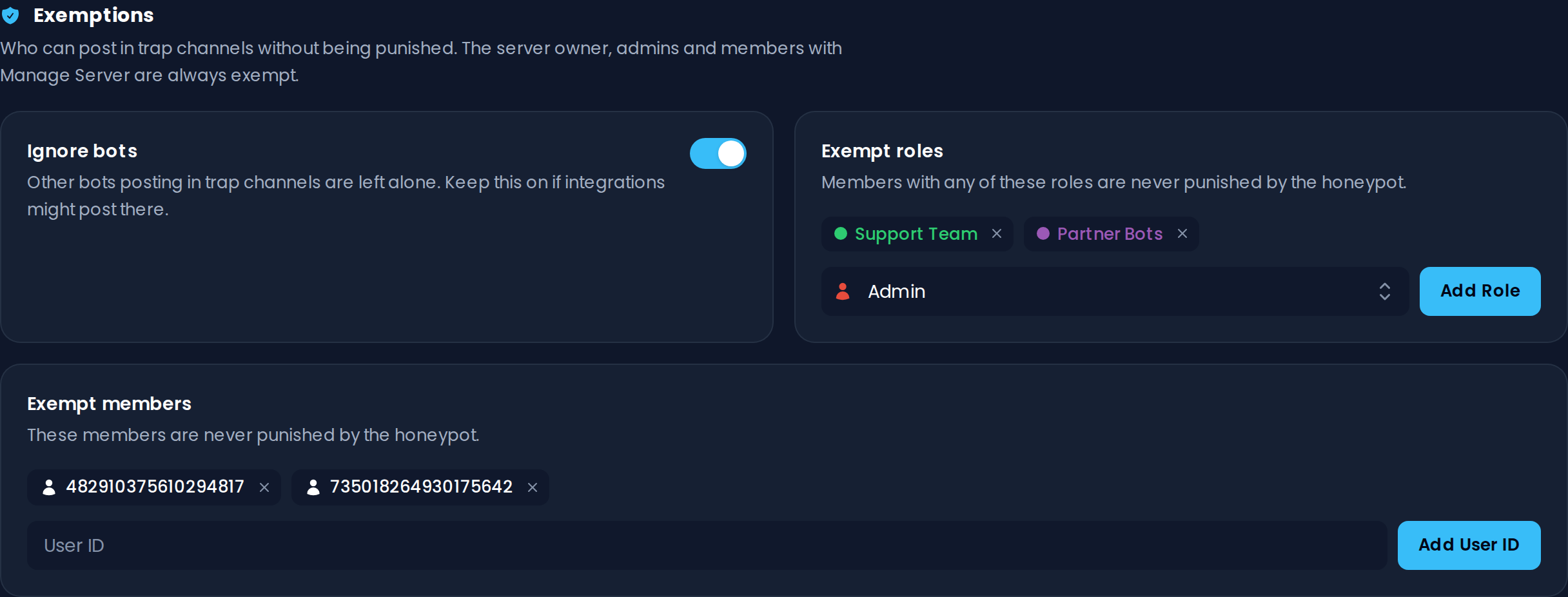
The people who could have configured the trap can never be caught by it: the server owner, administrators and members with Manage Server are always exempt.
On top of that:
- Ignore bots: messages from other bots in trap channels are left alone, so your integrations are safe. This is on by default; only Premium servers can turn it off.
- Exempt roles: members with any of these roles are never punished by the honeypot.
- Exempt members: these members are never punished by the honeypot. Add them by their user ID.
INFO
Free servers can exempt up to 3 roles and 3 members. Premium servers can exempt unlimited roles and up to 100 members.
Logging
Every trigger is reported to your Log channel: who was caught, when their account was created and when they joined, the message that gave them away, and what happened to them (including why, if the punishment failed).
With Ping role, Invite Tracker pings a role with every trigger report so your moderators can follow up.

Premium feature
The Ping role requires Invite Tracker Premium. The log channel is free for every server.
TIP
If the bot can no longer post in the log channel (for example because the channel was deleted), the log channel is cleared automatically. Pick a new one on the dashboard.
Misfire Protection
If several long-standing members of your server post in the trap within a short time, the trap is almost certainly pointed at a channel your community actually uses, not catching spam bots. The honeypot then pauses itself, posts a notice to your log channel and stays disabled until you review the trap channel and turn Enabled back on.
Trigger History
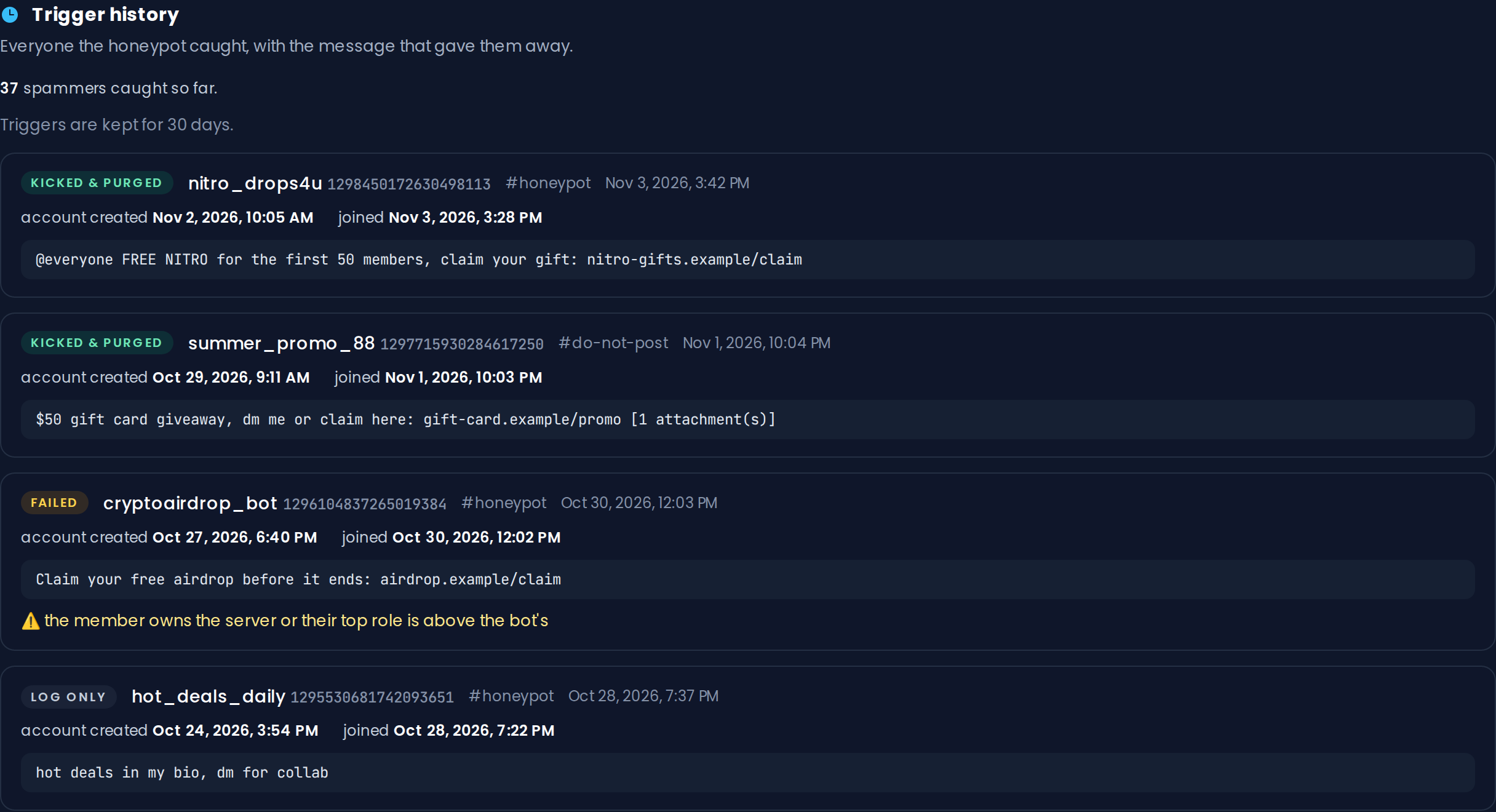
Every catch is recorded with the offending message kept as evidence. Review them in the Trigger history section of the dashboard's Honeypot page, along with a running total of everyone the trap has caught. Each entry shows whether the member was Kicked & purged, Banned or Timed out, whether it was Log only, or whether the punishment Failed and why.
INFO
Free servers keep the last 5 triggers from the past 3 days; Premium servers keep the last 20 from the past 30 days.