
Ticket History
The History page shows tickets opened in your server. Use it to find open tickets, review closed tickets, and open saved transcripts.
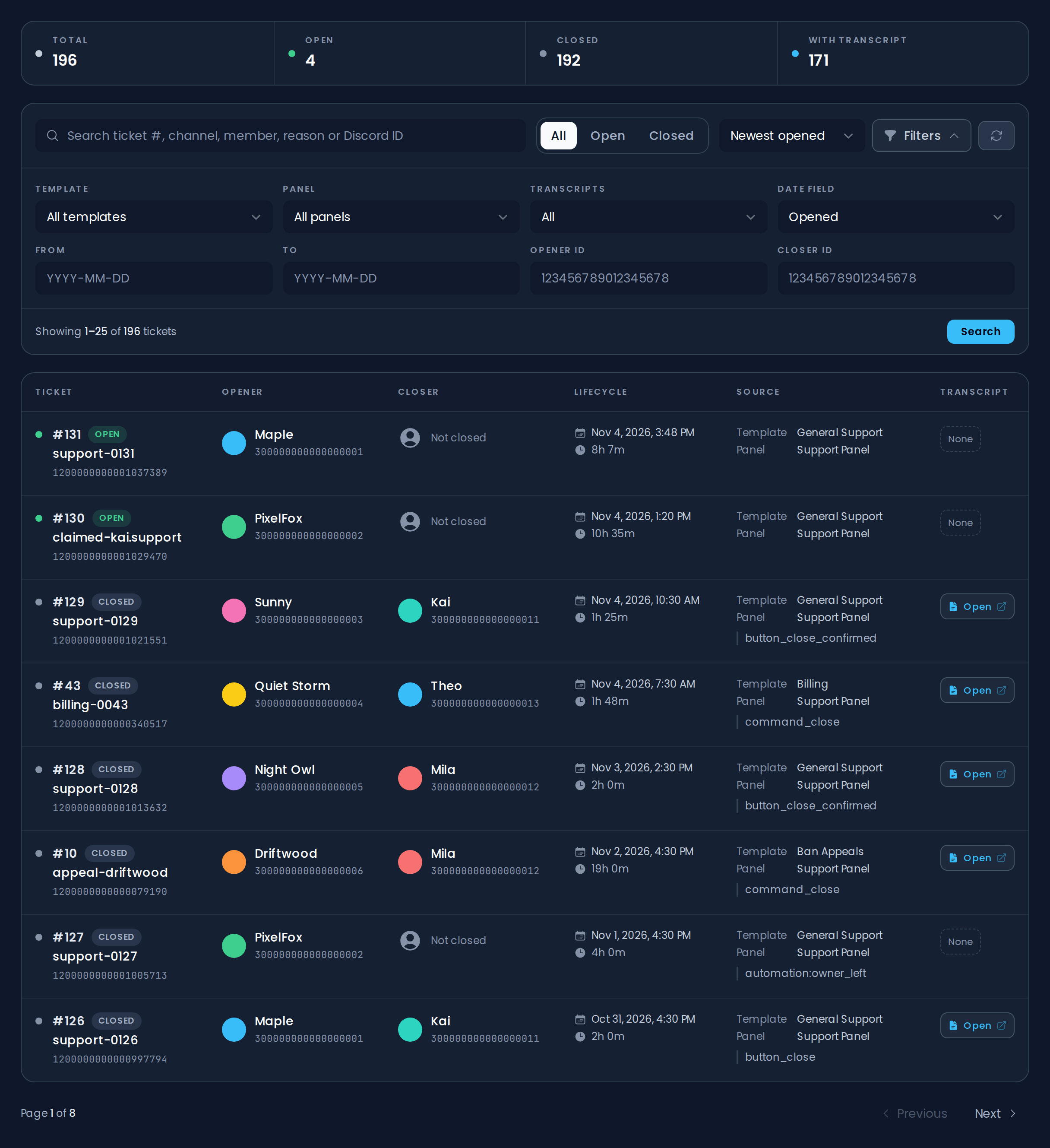
Overview
The top of the page shows how many tickets your server has in total, how many are Open and Closed, and how many have a saved transcript (With transcript).
Searching Tickets
Use the search bar to search by ticket number, channel, member, close reason, template or panel name, or Discord ID. Press Enter or click Search to run the search.
Next to the search bar you can:
- Switch between All, Open, and Closed tickets.
- Sort by Newest opened, Newest closed, or Newest transcript.
- Refresh the list.
Click Filters for more options:
- Template and Panel
- Transcripts: All, With transcript, or Without transcript
- Date Field with From and To: filter by the date the ticket was Opened, Closed, or its Transcript saved
- Opener ID and Closer ID
Dates can be entered as YYYY-MM-DD or DD/MM/YYYY. Click Reset to clear all filters.
History Table
The history table shows 25 tickets per page:
- Ticket: the ticket number, its status, the channel name, and the channel ID
- Opener and Closer
- Lifecycle: when the ticket was opened and how long it has been (or was) open
- Source: the template and panel the ticket came from, plus how it was closed
- Transcript: an Open link when a transcript exists
Use Previous and Next at the bottom to move between pages.
Transcripts
If a ticket has a saved transcript, click Open in the Transcript column to view it. Opening a transcript requires Discord login, and access depends on the template's transcript access settings.
See Ticket Templates for transcript setup.
WARNING
Transcripts on free servers are stored for 30 days after they are saved.
Premium servers keep transcripts with no time limit.
WARNING
Deleting a ticket channel manually marks the ticket as closed, but it does not run the normal close flow. Use the close button or /ticket-close when you want close roles, close DMs, close logs, and transcripts to run.